v2.9.2
Improved Open Matches & Policies
New open match controls: separate rating ranges, configurable step sizes, court booking policies, grace periods, and book-ahead limits per match type.
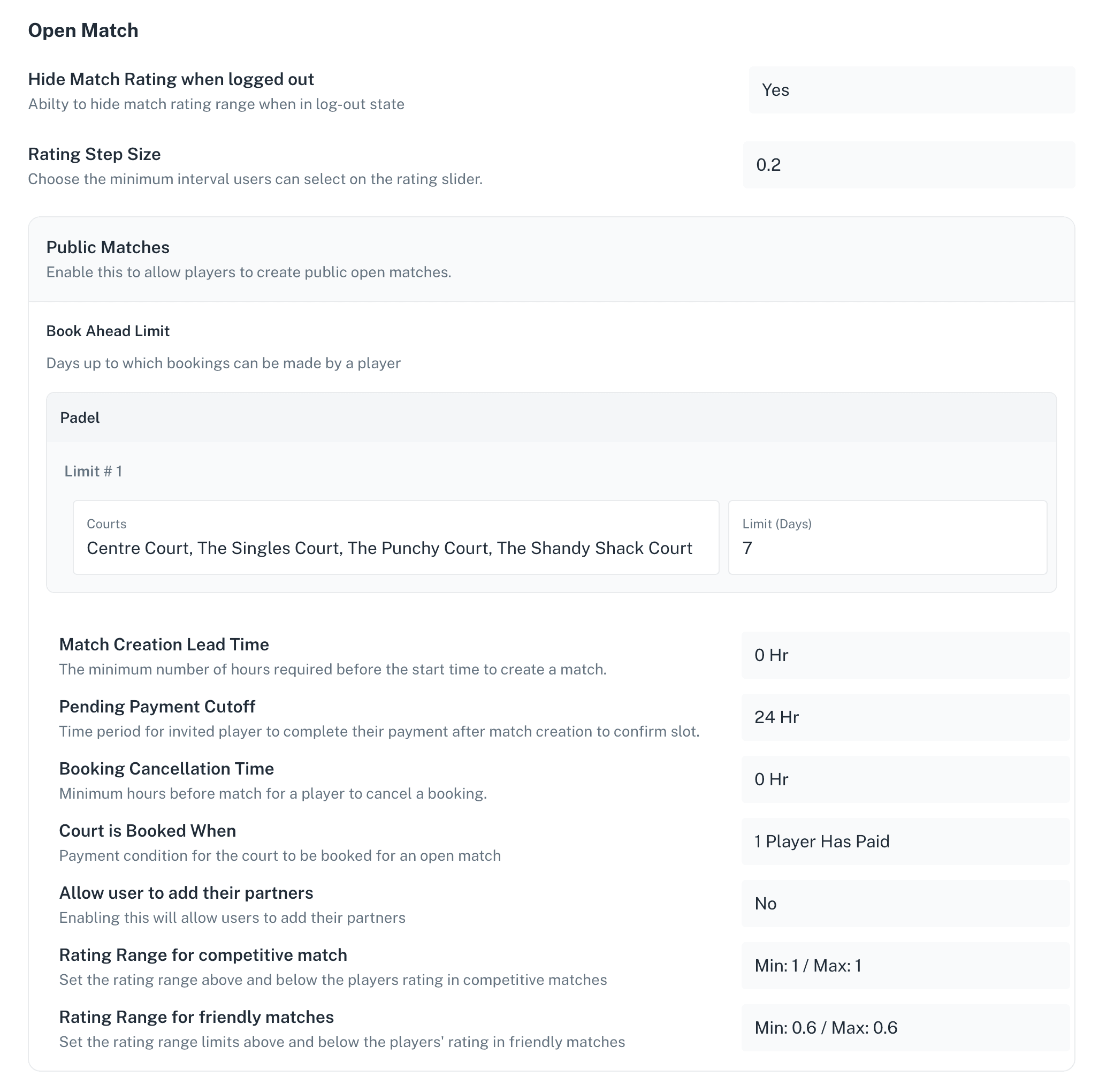
Separate Rating Ranges for Friendly & Competitive Matches
Open Matches now support different rating ranges for Friendly and Competitive matches.
What this means: Clubs can define separate rating boundaries for each match type. Friendly matches can have wider ranges to allow players of different skill levels to play together, while Competitive matches can have tighter ranges to ensure more balanced and fair gameplay.
How it’s used: When creating an Open Match, players first select the match type (Friendly or Competitive). Based on this selection, the system automatically applies the rating range configured by the club. Players can only set the match rating within these predefined limits, ensuring that all matches follow the club’s intended level of play.
Custom Rating Step Size for Open Matches
Open Matches now support configurable rating step sizes on the slider.
What this means: Clubs can define the minimum interval between rating values (e.g. 0.2). This gives more control over how granular match ratings can be, allowing for more precise player level selection.
How it’s used: When creating or adjusting an Open Match, players select a rating using a slider that follows the step size set by the club. Ratings move in fixed increments, ensuring consistency across all matches.
Open Match Court Booking Policy
Separate court booking policies have been introduced for Public and Invite Matches.
What this means: Clubs can now control when a court should be booked for an Open Match based on how many players have joined the match. This can be configured differently for Public and Invite-only matches.
How it’s used: When a player creates or joins an Open Match, the system checks the configured policy to determine whether the court should be booked. For example, clubs can choose to:
Book the court only when a minimum number of players have joined, or
Delay booking until the match is fully filled
This helps prevent unnecessary court blocking and optimizes court availability.
Court Booking Grace Period for Open Matches
A Grace Period has been introduced for court bookings linked to Open Matches.
What this means: When an Open Match is created, the system can temporarily reserve a court even if the match is not yet full. This ensures the court is not immediately released while players are still joining.
How it’s used: Once the Open Match is created, the court is held for a defined grace period set by the club.
During this time, players can join and complete the match.
If the required number of players join within the grace period, the booking is confirmed.
If the match is not filled in time, the court booking is automatically cancelled according to the club’s Open Match Court Booking Policy, making the court available again.
Separate Book Ahead Limits for Public & Invite Matches
Book ahead limits can now be configured separately for Public and Invite Matches.
What this means: Clubs can control how far in advance players can create or join matches, depending on whether the match is open to all players or restricted to invited participants.
How it’s used: Admins define the number of days in advance players can create Public and Invite-only matches. This provides better control over court usage—for example:
Limiting how far ahead Public matches can be created to prevent courts from being blocked too early
Allowing Invite Matches to be scheduled further in advance for better planning among specific groups
Learn more > https://support.padelos.co/en/articles/10717662-open-match-policies-admin-guide