Court Pricing Management
Comprehensive Pricing Overview
Get a clear, organized view of your entire pricing schedule in one simple, user-friendly interface. Easily review, adjust, and manage court rates across different days, times, and courts—all in one place.
Flexible Pricing Options
Easily customize pricing based on court, day, and time to maximize revenue and accommodate different player needs. Set individual rates or adjust pricing in bulk for multiple courts and days, streamlining your pricing management.
Scheduled vs Regular Pricing
Easily manage standard and event-specific rates with seamless scheduling. Set special pricing for tournaments or peak times without affecting regular rates. Apply adjustments to multiple courts and dates in just a few clicks for effortless pricing management.
Finances
Comprehensive Financial Insights
Gain a clear, detailed view of all transactions through the Finance section. Track player payments, booking fees, and revenue breakdowns with granular details, including court fees, discounts, and taxes. Ensure complete financial transparency and streamline club accounting with ease.

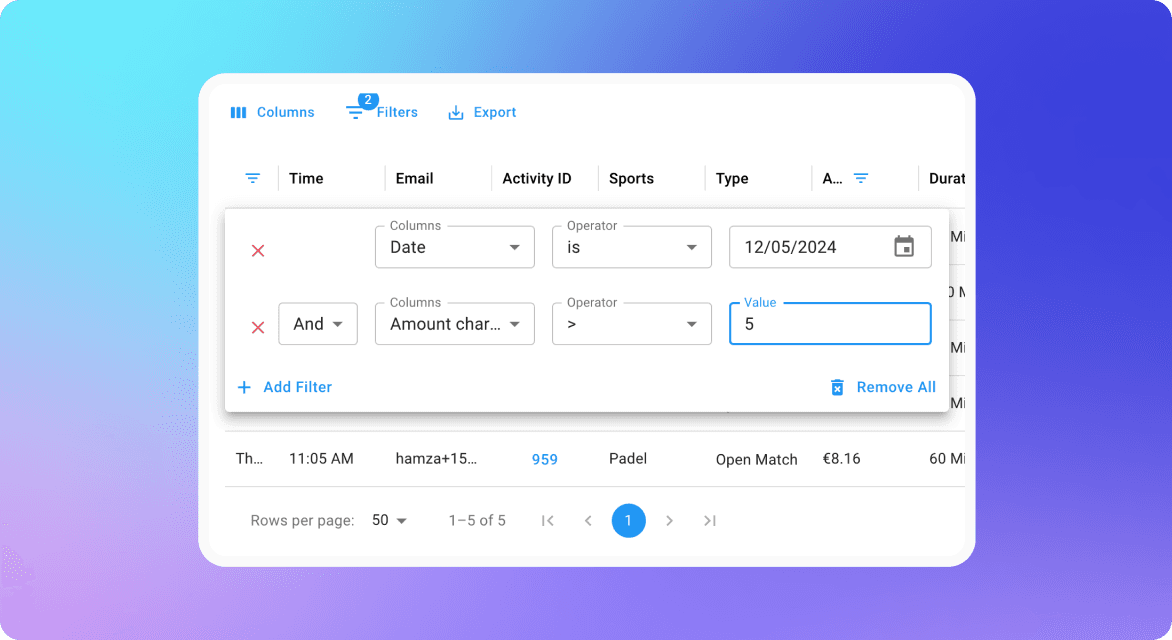
Easily refine and analyze data with advanced filtering options. Customize views to focus on specific transactions, booking types, payment statuses, or time periods—giving you full flexibility to extract the insights that matter most for reporting and financial management.
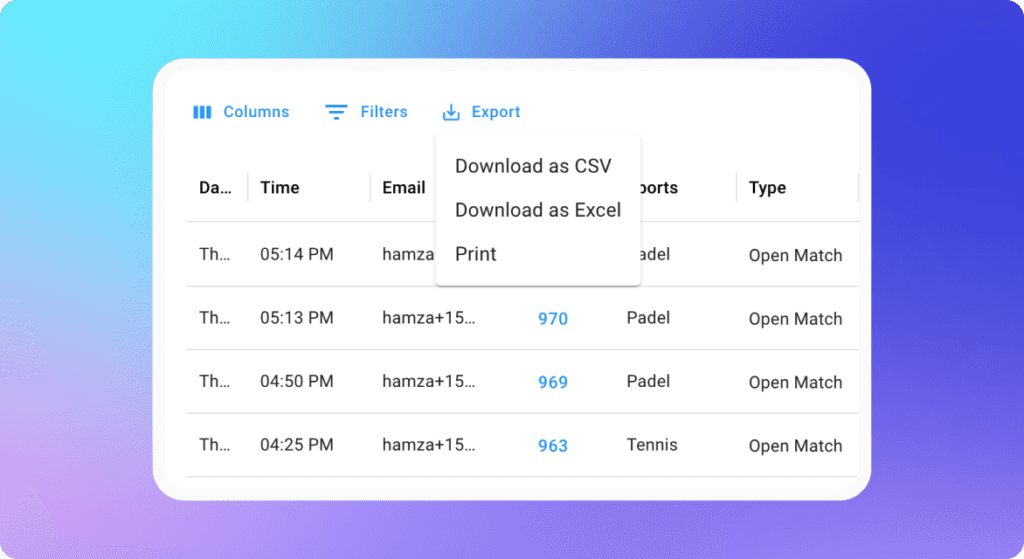
asily export financial data in multiple formats for seamless sharing and record-keeping. Generate detailed reports and download them instantly for effortless financial management and analysis.
Gain full visibility into every transaction with a clear split between club earnings and platform fees. Easily track revenue, understand deductions, and manage finances with complete transparency.

Policies
Optimize court bookings with flexible pricing, time-based restrictions, and sport-specific rules to maximize efficiency. Set clear booking limits and cancellation policies to ensure smooth operations. Manage event cancellations effortlessly with customizable notice periods. Control refunds and payments by enabling wallets and choosing between bank transfers or wallet credits, giving your club full financial flexibility.
Set flexible pricing for the same court based on different days and time slots. Optimize rates to attract more bookings during off-peak hours while maximizing revenue during peak times.

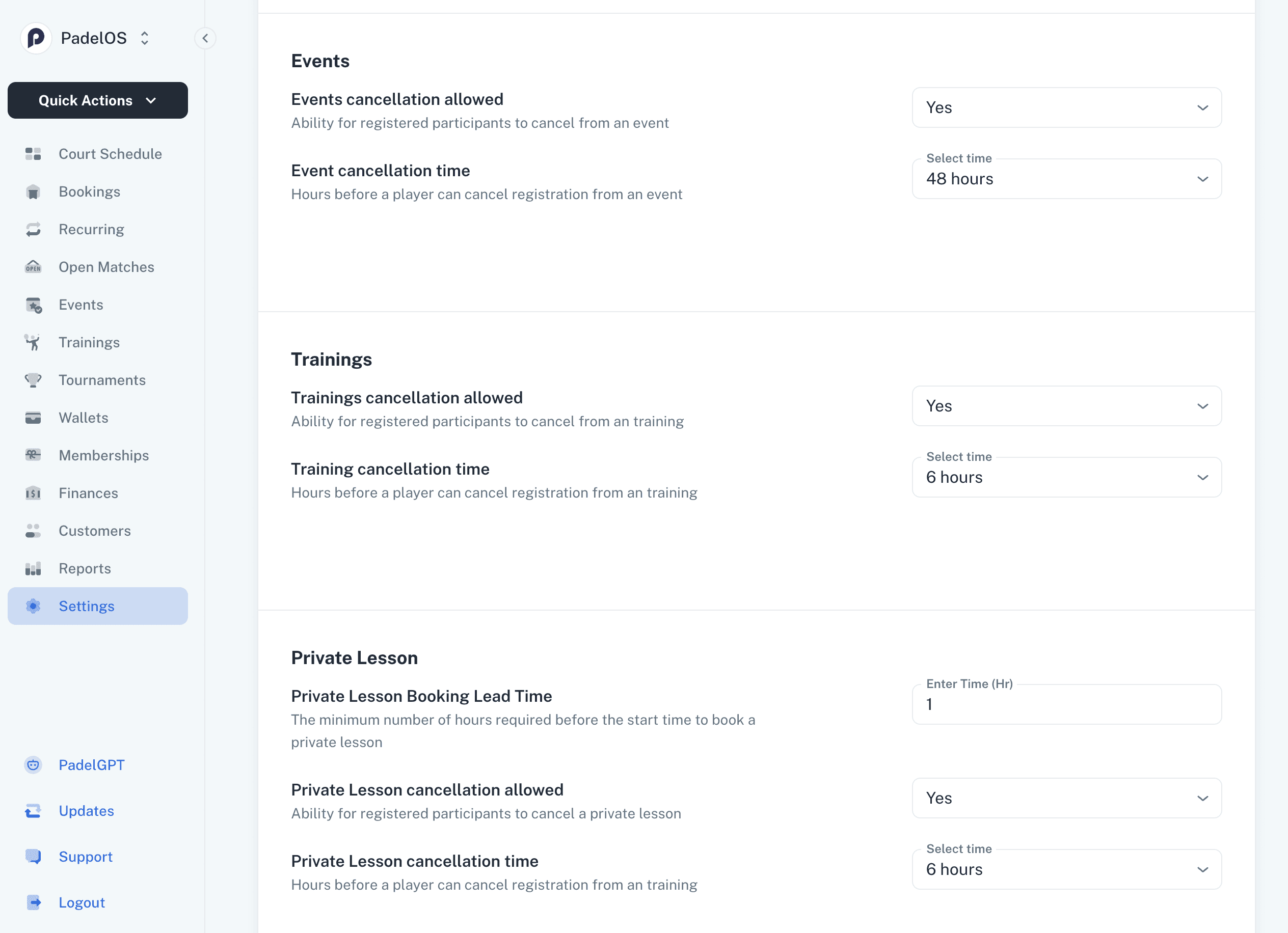
Set precise booking limits and enforce clear cancellation policies with minimum notice requirements. Ensure smooth scheduling while maintaining flexibility for both players and club operations.
Take full control of your court scheduling with flexible booking rules:
Booking Durations – Set specific time slots for each sport based on its unique requirements.
Sport-Specific Rules – Apply customized booking restrictions for different sports to ensure fair usage.
Flexible Scheduling – Choose which days restrictions apply, allowing for seamless and adaptable scheduling.

Easily manage event cancellations by enabling or disabling registration cancellations. Set a minimum cancellation notice period to ensure smooth scheduling and prevent last-minute changes
Wallet & Refund Management
Enable or disable the wallet feature based on your club’s needs. Easily manage refunds by selecting preferred channels—wallet credits or bank transfers—for player-canceled bookings and events.

Wallets
Give players a fast, flexible way to pay across your club. The PadelOS wallet lets players pre-load credits and use them for court bookings, events, trainings, and more — speeding up checkout and giving your club predictable, upfront revenue.
Players get a clear, visual overview of their wallet balances directly from their club page. For clubs operating across multiple locations, each location gets its own wallet card — so a player active in London, Dubai, Amsterdam, and Barcelona sees their balance for each at a glance, with a single Top Up button to add funds.
Players can also share a gifting link with friends and family using the Get a Wallet Top-up Gift card. Anyone with the link can select an amount, add a personal message, and the credit goes straight into the player's wallet — no admin involvement needed.

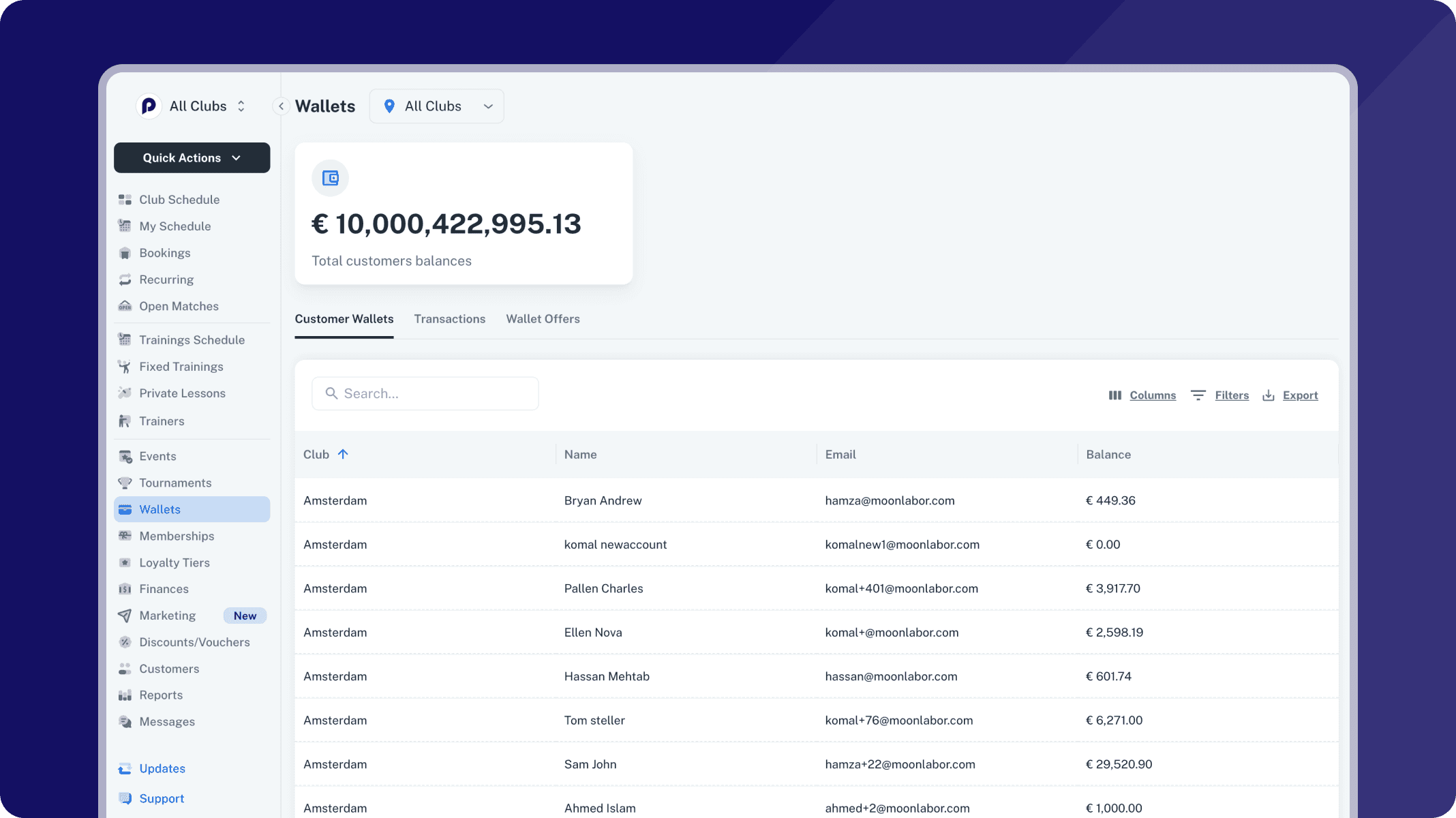
On the admin side, the Wallets section gives you a complete view of all customer balances in one place. The total customer balances are displayed at the top, with tabs for Customer Wallets, Transactions, and Wallet Offers to quickly navigate between views.
The Customer Wallets grid lists every player with their club location, name, email, and current balance — with search, filters, column customization, and export built in. Whether you need to look up a specific player's balance or pull a full report for your finance team, everything is accessible from this single view.
Seamless Wallet Payments at Checkout
When a player books a court, the wallet integrates directly into the checkout flow. Players see their billing summary — including player charges, applied discounts, platform fees, and any active discount codes — with the wallet balance available to cover payment.
For employees linked to a corporate account, a Select Wallet prompt lets them choose between their personal wallet and their corporate wallet. Each option shows the available balance and the associated account, so the player always knows exactly what they're spending and from where. All usage follows the limits and rules set by the club or corporate admin.

Corporate Accounts
Let companies bring their teams to your club with dedicated corporate accounts. Manage employees, control spending, and track wallet activity — all from a single, structured view that keeps things simple for your club and your corporate clients.
Corporate accounts sit alongside your regular customers under a dedicated Corporations tab. Each account gives you a quick overview of the company name, number of employees, assigned manager, activation date, and current wallet balance — so you can see the health of every corporate relationship at a glance. Add new companies in seconds using the Add Customer button, and use search and filters to find what you need as your client list grows.

Each corporate account comes with its own wallet. Top up the balance, set a monthly spending limit per employee, and decide whether corporate credits can be used for bookings that include guests or non-members. These controls give companies confidence in how their budget is used, while keeping admin effort to a minimum on your side.
Every transaction — top-ups, bookings, deductions — is logged with full details and can be searched, filtered, and exported. Whether you need a quick balance check or a full monthly breakdown for a corporate client, the information is always at hand.

Inside each corporate account, the Employees tab gives you a full view of the company's team. Add users individually or in bulk, and assign each person a role — Manager or Employee. Managers can log in on behalf of the company to oversee their team and handle wallet top-ups, while employees simply book and play. Active and cancelled users are tracked separately, keeping your records organized without losing history.

Lighting & Access Control
Automatically manage court lighting and access for every booking. PadelOS integrates with leading lighting and lock systems so your players always have everything they need, and your staff never have to intervene manually.
PadelOS connects directly with EventLogic and Meshlink to automate court lighting for every booking. When a player books a court, they automatically receive a notification confirming their lights will be activated for their session. No phone calls, no manual switches, no confusion. Club admins can manage lighting schedules and settings directly within PadelOS, ensuring courts are lit exactly when needed and turned off automatically after each session ends.
For clubs with electronic lock systems, PadelOS generates and delivers a unique access code with every booking confirmation. Players receive their code directly in the app, giving them seamless entry to the court without needing staff assistance. Codes are session-specific and expire automatically, keeping your club secure while delivering a frictionless experience for your players.
TV Screen
Activities on TV Screens (Coming June 2026)
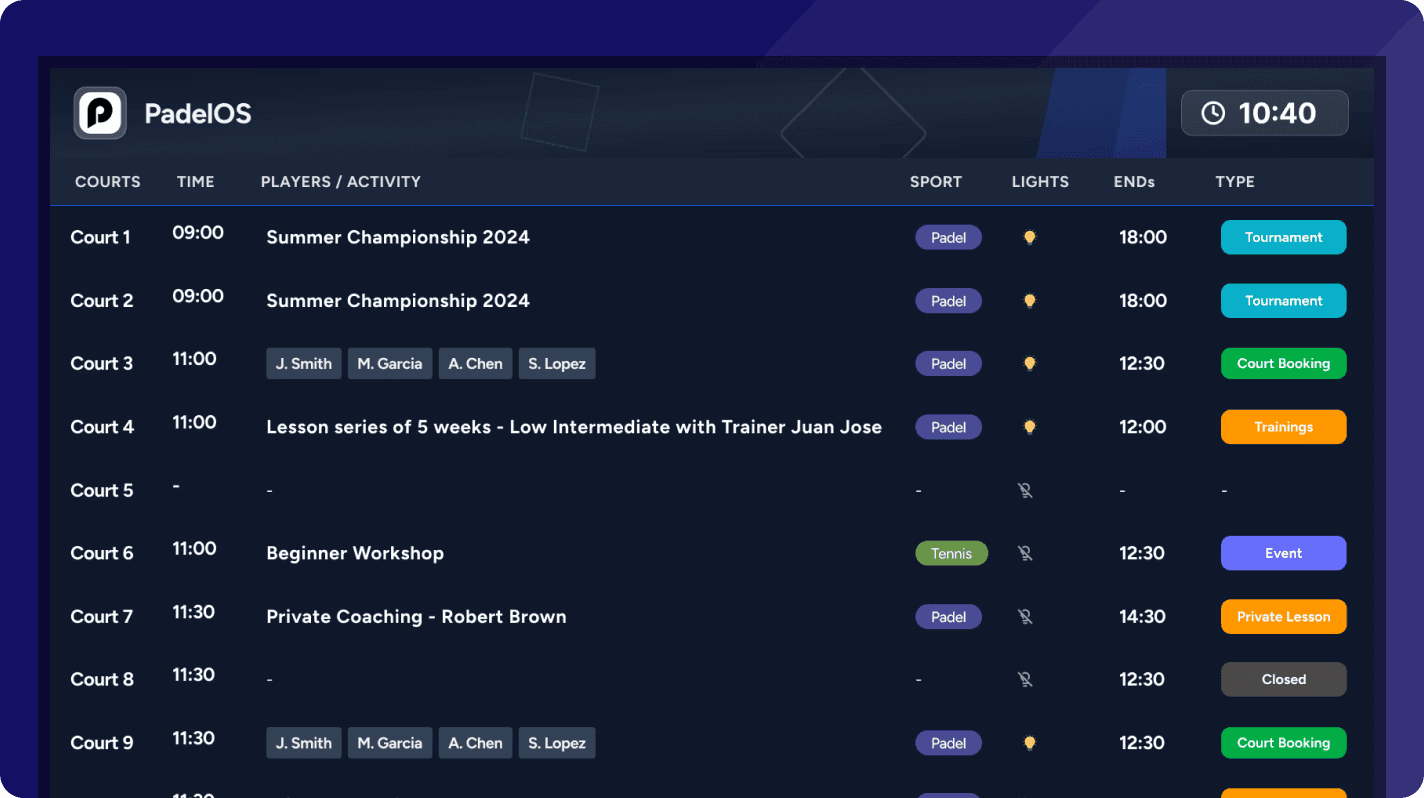
Keep players and staff informed with real-time visibility of everything happening at your club. PadelOS TV screens show all upcoming activities at a glance, from court bookings to trainings, events, tournaments, and private lessons.
Display all upcoming activities, ordered by start time.Only scheduled activities are shown, keeping the screen focused and easy to read. Empty or closed courts are hidden, so attention stays on what’s happening next.

Show all courts, including empty ones, within a defined time window. For example, at 10:40 the screen can highlight activities starting at 11:00 and 11:30. As time progresses, the display automatically updates to the next window, giving a clear picture of court usage and upcoming sessions.